
Cornell Notes: Method, Template & Examples

Note-taking has been a popular study method for decades. It helps you keep track of important information as you sit through a lecture, and you can always go back to your notes for focused studying before an exam.
There is a lot of research into how to make effective, good-quality notes. The process can be:
- Passive, in which you copy the lecture in your notepad word-for-word
- Active, where you engage with lecture material as you summarize it, write it in your own words, recall your notes from memory, and review them every now and then
In a well-known series of experiments published in Psychological Science, researchers Pam Mueller and Daniel Oppenheimer found that students who copied down more of a lecture word-for-word remembered less than students who summarized and reframed the material in their own words.
The Cornell note-taking method is a famous active note-taking system developed by a professor at Cornell University. Today, it's taught by learning centers at universities across the U.S., including Cornell University, Stanford University, and Utah State University.
In this article, you will learn what exactly Cornell notes are and how to take them for maximum retention.
What is the Cornell method?
The Cornell study method is a note-taking method first introduced by Walter Pauk, an education professor at Cornell University in the 1950s. In 2004, he outlined the system in detail in Chapter 10 of the book he co-authored, How to Study in College (10th ed.).
The Learning Strategies Center (LSC) at Cornell University has developed a Canvas module to help students understand the Cornell note-taking system. It is made public for anyone to learn.
Cornell notes are helpful when reading textbooks and when using online resources.
What are Cornell notes?
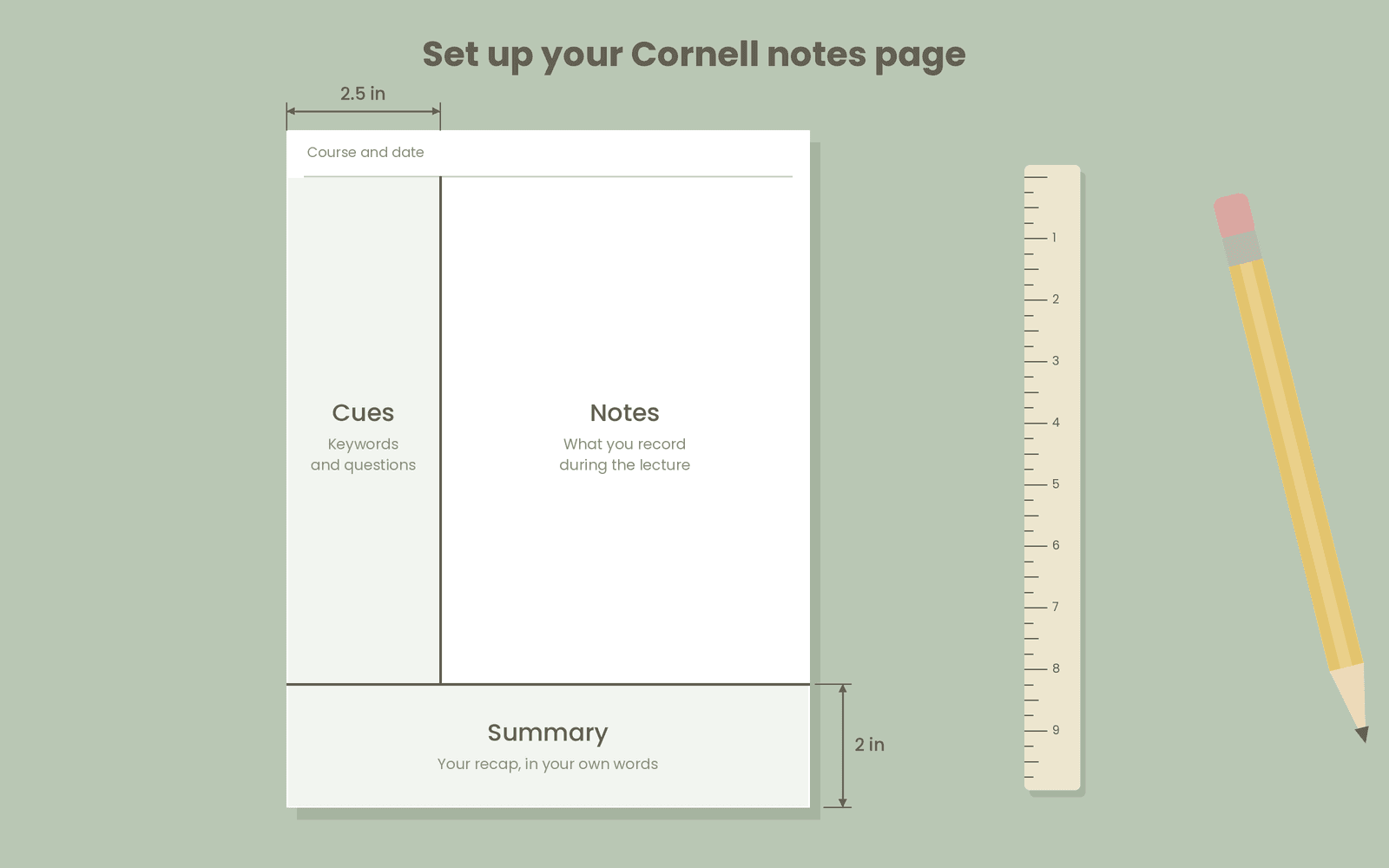
The Cornell note-taking system trains you to actively interact with the notes you take during a lecture. To take Cornell notes, you divide your note-taking page into 3 parts:
- Notes, the biggest section of your page, is reserved for writing down whatever you deem important while you’re in a lecture. It should take about two-thirds of the page.
- Cues, a vertical column on the side of your notes, is dedicated to keywords or questions that arise while note-taking.
- Summary, a section at the bottom of the page in which you retrieve from memory what you remember from your notes. It is not a rewrite of your main notes, rather, a place to test your memory as you summarize, in your own words, what you’ve just learned.
Research on Cornell notes reports this study system to be very effective.
In a study of 40 first-year science students at Albaha University undergoing English listening comprehension training, researchers trained one group of students in Cornell note-taking strategies and observed their performance on tests before and after the training. The remaining students followed standard coursework without note-taking instruction.
Both groups initially scored similarly low on the pre-test (averaging 5.25 and 5.17 correct answers out of 12, respectively) because they were unfamiliar with note-taking techniques. On the post-test, the Cornell-trained group increased their mean correct score to 7.58 out of 12, whereas the control group showed no improvement, averaging 4.83 correct answers.
Similarly, a quasi-experimental study evaluated 128 nursing students at the Higher Institute of Nursing Professions and Technical Health in Morocco to measure how Cornell note-taking training influenced both note quality and academic performance. This study also involved two groups: one was trained in the Cornell method (62 students), and the other was left untrained (66 students).
The Cornell-trained group achieved higher note quality and learning outcomes:
| Metric | Control Group (Standard Method) | Intervention Group (Cornell Method) |
| Note Quality Score (0–20 Scale) | 6.14 | 19.05 |
| Baseline Knowledge (Pre-test / 20) | 11.80 | 11.62 |
| Academic Performance (Post-test / 40) | 17.95 | 30.87 |
How to take Cornell notes (The 5-Rs method)
Before we go into the note-taking steps, you need a specific page layout.
Draw a line about 2.5 inches from the left side of the page to divide your page into a narrower left section for Cues and a wider right section for Notes. It should go all the way down until the last 2 inches of your section. This undivided bottom section will be used for Summary.
Alternatively, you can use the legal notepads made for law students since they are already divided into a narrower left and a wider right margin.
If you want, you can leave some space at the top of the page empty to label it with your course name and date.
Now that your layout is ready, here’s how to take Cornell notes via the 5Rs method according to Cornell University LSC:
- Record
- Reduce to questions
- Recite
- Reflect
- Review
Here’s what each R means in this method:
Step 1: Record
The first step to note-taking is recording what you hear during a lecture using telegraphic sentences in the Notes section of your page.
A telegraphic sentence uses 2–5 words to get the main point across without worrying about the grammatical sequence of words. It just includes the key nouns, verbs, and adjectives and no grammatical supporting words (like conjunctions, articles, etc.) to save time as you write.
For example, if you hear the sentence, “The water boils when it reaches 100°C” in your lecture, you note it down telegraphically as “Water boils at 100°C.”
Step 2: Reduce
After taking the notes, you go to the left-side margin of your page, i.e., the Cues section, and write down the keywords that you must remember from this lecture.
Try to also reduce your notes content into questions you can use to test yourself later. The questions will also help you deepen your understanding, form relationships between similar concepts, and help with retention.
This step is best done as soon after the lecture as possible, when the content is still fresh.
Step 3: Recite
Now you cover the Notes section of your page, leaving only the Cues section visible. Based on the questions and keywords you extracted into the Cues column, try to recall the concepts you learned from the lecture.
Say the answers to the questions you wrote out loud to fixate them in your long-term memory. You can make your recall strong by following the Feynman technique. Here’s how it works:
- Say the topic you just learned out loud as if you are explaining it to a child
- Notice where you get stuck while speaking and go back to your Notes section to correct your weak concepts
- Explain it out loud again until you can do it 100% clearly, using real-world everyday examples
Step 4: Reflect
After you know the content well enough, spend some time on your notes by integrating your previous knowledge with how it relates to the current lecture.
Write down 2–3 topics similar to what you have just studied and try to differentiate between them. Note down anything that you realize you don’t know yet to identify your knowledge gaps.
And if you are a science student, read up on some published literature for topics you want to go deeper on so that you strengthen your knowledge base.
Finally, use the Summary section of the page to jot down a quick overview of what you should know about the topic in your own words.
Step 5: Review
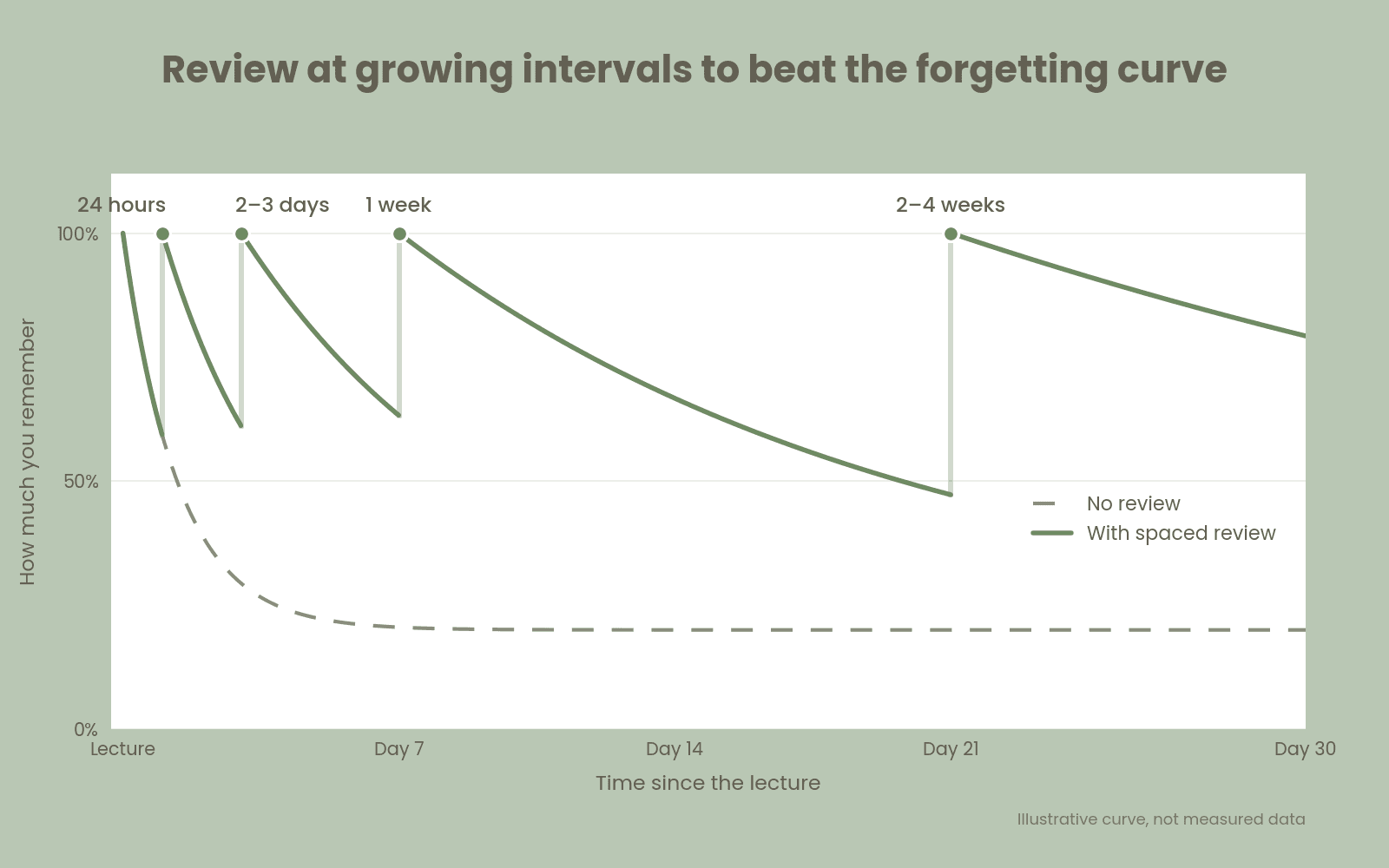
The human mind has a natural forgetting curve, which drops gradually as you lose memories of things you don’t revisit over and over again. So, if you want to retain any information long-term, you must review it at increasing intervals.
Forgetting is the fastest in the first 20 minutes to 24 hours after learning something. It then slows down with each passing day.
To keep the material fresh in memory, make sure you review your notes within the first 24 hours, and then every few days. You can also convert your lecture notes into flashcards for easier review and better retention.
Cornell notes template
Here’s a sample template you can use to take Cornell notes.
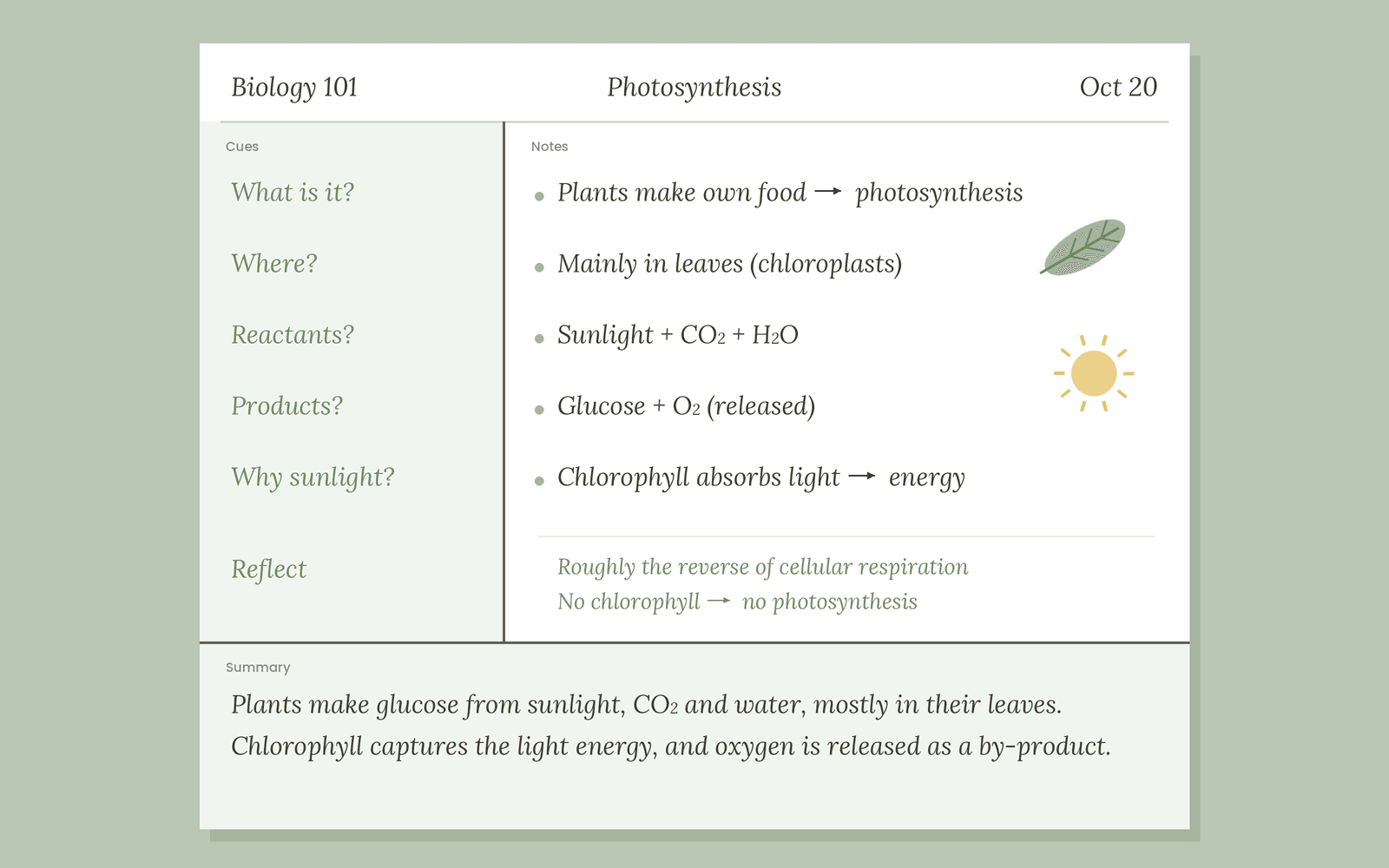
If, for example, you have a science lesson on Photosynthesis, you will use the Notes section to write down the most important information you learn in short sentences rather than making them grammatically accurate.
Here are a few example sentences from a photosynthesis lesson written in Cornell style:
- Plants make their own food → photosynthesis
- Mainly occurs in leaves
- Uses sunlight + CO₂ + H₂O
- Produces glucose + O₂
- Chlorophyll absorbs sunlight
Once you’re done with the lecture, you’ll go to the Cues section to form some questions you could test yourself on, for instance:
- What is photosynthesis?
- Where does it occur?
- What are its reactants?
- What are the products?
- Why does it need sunlight to happen?
You don’t even need to write full question sentences there. Just a keyword would suffice (e.g., Reactants?) for most questions.
Then you cover the Notes section as you try to recall the answers to these questions. If you cannot answer any of the questions, uncover your Notes area to read it again and then try recalling it once more.
You also need to reflect on the notes and add in relevant context. For example, you could use the space to differentiate photosynthesis vs. cellular respiration, write about what would happen if a plant had no chlorophyll, what happens to the process if sunlight is not available, and so on.
At the end, write a summary of everything you learned about the topic.
Here’s an illustration of what your Cornell Notes page can look like:
Use RemNote for efficient note-taking
The benefits of Cornell notes are best reaped when you actively interact with the notes. Follow the 5Rs to recall the information you’ve just noted down and review it over and over again.
Many students find it better to convert their notes into flashcards they review the content from. RemNote brings the two in one place such that you don't need two separate tabs, one for your notes and the other for flashcards. Instead, you can study a card for active recall and switch to the notes format with one click whenever you need to return to its context.
RemNote uses the scientifically proven spaced repetition method to schedule your flashcard reviews to fight the forgetting curve. It has a Free Spaced Repetition Scheduler, an algorithm that estimates when you are likely to forget a card so that it can show it to you before you lose its memory. Essentially, it saves you from the hassle of remembering when to review your notes.
It also allows you to add supporting images, videos, audio files, PDFs, slides, etc. within your notes in case you want to go back to the original course material.
Sign up for RemNote to take notes in the Cornell way and review them with flashcards for the best retention.
FAQs
How do you do Cornell Notes?
You use the Cornell notes template to take your notes during the lecture and then use the Cues and Summary space after the lecture ends to interact with the study material actively.
Are Cornell Notes actually helpful?
Yes! Multiple research studies have tested the effectiveness of Cornell notes on students' learning performance and have found positive results. However, the notes work best when you use active recall to test yourself with the cues and review them periodically.
Are Cornell Notes good for ADHD?
Some students with ADHD find the blank white note-taking pages overwhelming. Cornell notes templates give them a structure to follow and categorize information, but you need to be consistent with reviews.
Are Cornell Notes free?
Yes! Cornell University’s learning module to understand how to take Cornell notes is publicly available. You can also find a free Cornell notes template on our page to practice what you learn.