Flashcard App Comparison: RemNote vs Anki
Compare a dedicated flashcard app with a complete notes-to-memory system for serious learning
Introduction
In the world of digital flashcards and study tools, two names often come up: RemNote and Anki. Both are powerful tools designed to help students study more efficiently, but they each have their unique strengths and weaknesses. Below, we'll objectively compare these two platforms, highlighting their features, ease of use, and pricing. While this article is written by one of the co-creators of RemNote, we'll be upfront about RemNote's shortcomings and Anki's strengths.
Look
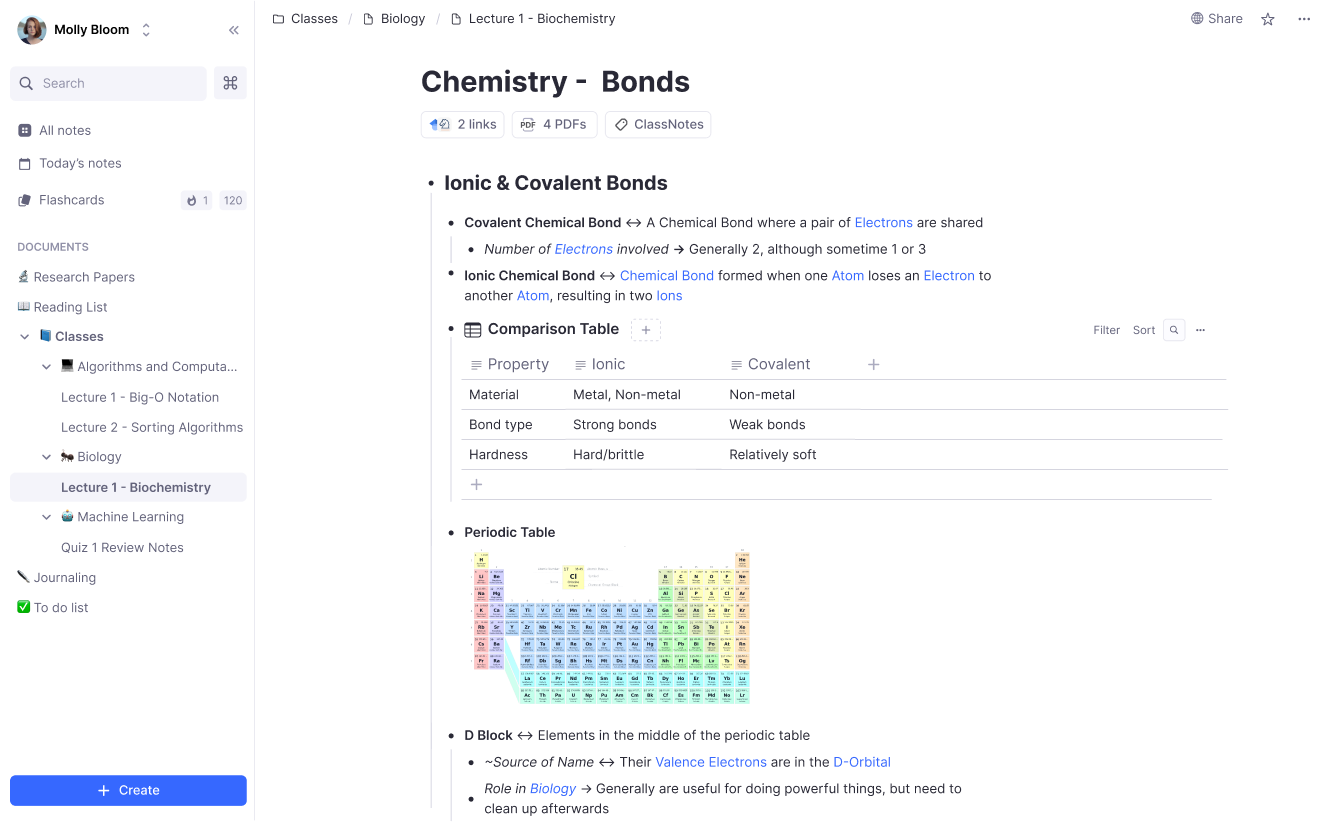
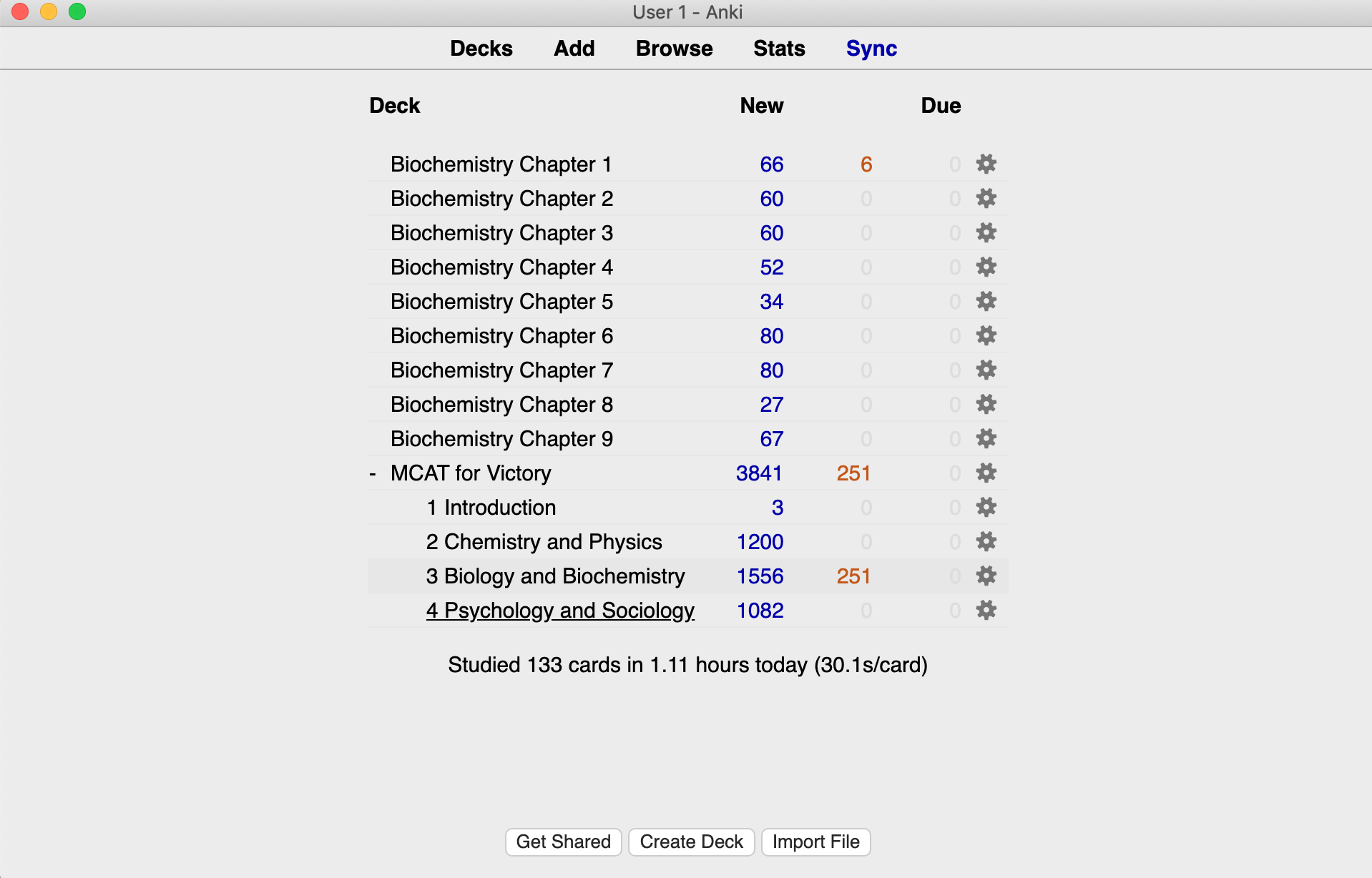
Anki's interface, often described as a "vintage" or "beta testing app from the 90s," is functional but lacks the sleek, modern design of RemNote. RemNote's interface is more user-friendly, resembling popular platforms like Notion or Google Docs. It's easy on the eyes and intuitive to navigate, making it a winner in this category.
Content Structure and Context
One of the main criticisms of traditional flashcard apps is that they present information as standalone pieces, which can be challenging to learn if taken out of context. RemNote addresses this issue by allowing you to structure the information exactly how you think about it.
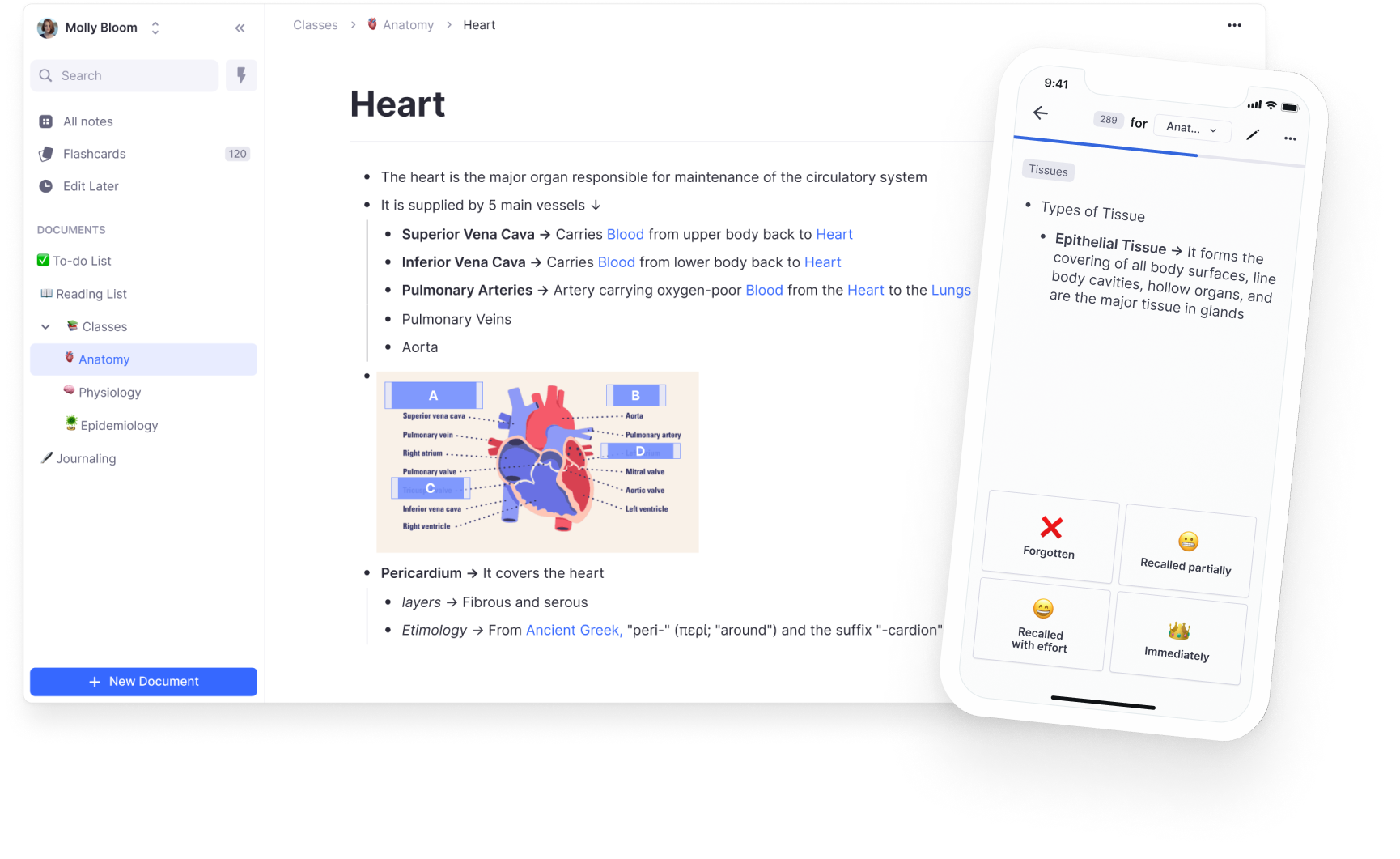
In RemNote's your notes are arranged hierarchically similar to a mind-map, providing context when viewing the flashcards in the practice interface. Anki's decks can also be arranged hierarchically, but RemNote takes it a step further by allowing knowledge to be interlinked, helping you connect the dots and synthesize ideas.
In RemNote's your notes are arranged hierarchically similar to a mind-map, providing context when viewing the flashcards in the practice interface. Anki's decks can also be arranged hierarchically, but RemNote takes it a step further by allowing knowledge to be interlinked, helping you connect the dots and synthesize ideas.
Speed of Flashcard Creation
Creating flashcards is a breeze with RemNote. You can create a flashcard in just 0.43 seconds. Just type two equal signs == to make a flashcard. That's it.
Creating cards in Anki, on the other hand, is more time-consuming, especially if you're creating complex cards. Additionally, RemNote offers shortcuts that further boost your productivity, and an omnibar to edit multiple notes and flashcards at once.
Creating cards in Anki, on the other hand, is more time-consuming, especially if you're creating complex cards. Additionally, RemNote offers shortcuts that further boost your productivity, and an omnibar to edit multiple notes and flashcards at once.
Join 1,000,000+ students to get an extra day off each week!
Brenna L.
UPenn PSOM
Game-changer. 5 minutes learning RemNote saved me literally hundreds of hours of studying.
Shabab Bin M.
High school student
Everyone in this team is so passionate. And did I mention the product itself? MINDBLOWING!!! The rate at which it accelerates learning is insanely high! Safe to say, It is going to be the best knowledge handling app out here.
Naveed F.
Weill Cornell Medical School
Great app, way easier than Anki. Looks cleaner and saves me time switching between apps.
Cameron W.
The Johns Hopkins University School of Medicine
All my notes and flashcards in one place. Used to waste hours a week just copying notes from Notion into Quizlet. Seriously underrated – key part of my daily workflow as a med student.
Feature Offering
Both RemNote and Anki use Spaced Repetition System (SRS) for efficient learning. However, RemNote offers more than just flashcards.
It's a note-taking tool that allows you to connect ideas with references. If you are like most students, you need to take notes too. In RemNote you can create flashcards right in your notes. No need for frustrating app switching (ex. Notion + Anki).
RemNote also has a PDF and file annotation feature, so you can create flashcards directly from your PDFs, reading material, or lecture slides. Another killer feature, unavailable in Anki are tables and databases (similar to the beloved Notion feature), making it the most comprehensive study tool on the market.
However, it's worth noting that RemNote currently only supports audios that are posted on the internet with public links, while Anki fully supports audio files and even allows voice recording in the app.
It's a note-taking tool that allows you to connect ideas with references. If you are like most students, you need to take notes too. In RemNote you can create flashcards right in your notes. No need for frustrating app switching (ex. Notion + Anki).
RemNote also has a PDF and file annotation feature, so you can create flashcards directly from your PDFs, reading material, or lecture slides. Another killer feature, unavailable in Anki are tables and databases (similar to the beloved Notion feature), making it the most comprehensive study tool on the market.
However, it's worth noting that RemNote currently only supports audios that are posted on the internet with public links, while Anki fully supports audio files and even allows voice recording in the app.
Flashcard Experience
Both RemNote and Anki provide a similar Spaced Repetition flashcard reviewing experience and detailed statistics on your flashcard process. One of the biggest difference of the app's Flashcard reviewing interface, is that in RemNote, every card is viewed in context and shows its parent hierarchy. This helps you to grow your knowledge and remember its high level connection rather than learning isolated facts.
By default the flashcard scheduler will prioritize the most recent or difficult cards. If you have a lot of flashcards and only limited time to study every day you'll want to prioritize certain groups of flashcards over others. In Anki, this is pretty complex and requires configuring subdecks and modifying the settings in that subdeck so that the cards in it appear more frequently. RemNote has more simple and easy to use flashcard prioritization. You can change the flashcard document's (or Deck's) priority in the priority dropdown between Currently Studying, Maintaining, Paused, or No Priority (default).
By default the flashcard scheduler will prioritize the most recent or difficult cards. If you have a lot of flashcards and only limited time to study every day you'll want to prioritize certain groups of flashcards over others. In Anki, this is pretty complex and requires configuring subdecks and modifying the settings in that subdeck so that the cards in it appear more frequently. RemNote has more simple and easy to use flashcard prioritization. You can change the flashcard document's (or Deck's) priority in the priority dropdown between Currently Studying, Maintaining, Paused, or No Priority (default).
Ready to add an extra day to your weekend?
Join 1,000,000+ students - it's free
Pricing
Anki is open-source and free, but it lacks the funding and development to continually, significantly improve it (as the 90s style interface might prove). RemNote, on the other hand, operates on a freemium model, offering unlimited cross-device synced notes and flashcards storage for free. In addition, some advanced pro features like Aliases and templates are available for a small monthly or yearly subscription.
Conclusion
If you're solely interested in creating simple flashcards for language learning, Anki might be a better fit. However, if you're looking for a comprehensive study tool that will save significant time studying, RemNote is the clear winner.
Moreover, if you're already an Anki user, RemNote has a built-in Anki importer that will even import your study schedule and all images. You can upload your entire Anki knowledge base into RemNote or import entire Anki decks and start studying immediately.
Moreover, if you're already an Anki user, RemNote has a built-in Anki importer that will even import your study schedule and all images. You can upload your entire Anki knowledge base into RemNote or import entire Anki decks and start studying immediately.
Frequently Asked Questions
Can RemNote import my Anki decks?
Yes. Export your deck from Anki as an .apkg file (checking all the export options), then import it into RemNote. Your cards carry over, so you can keep studying without rebuilding them.
Does RemNote use the same spaced repetition algorithm as Anki?
Both RemNote and modern Anki support established spaced-repetition scheduling, including FSRS. The larger difference is the learning workflow: Anki starts with cards and decks, while RemNote starts with notes, lectures, and PDFs, then keeps each card connected to that source context.
Is RemNote better than Anki for medical school?
Anki has a large ecosystem of premade medical decks, which is useful if your workflow begins and ends with cards. RemNote is the stronger fit when you want to annotate lectures, organize concepts, create cards in context, and manage long-term review without maintaining a separate note-taking system.
Ready to try RemNote?
Replace your apps in 2 clicks